
 Discussion
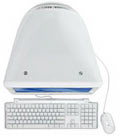
This update provides important issue fixes and is recommended for the aluminum 20-inch and 24-inch iMac models with 2.0, 2.4, or 2.8 GHz processors.
Discussion
This update provides important issue fixes and is recommended for the aluminum 20-inch and 24-inch iMac models with 2.0, 2.4, or 2.8 GHz processors.
Discussion
This update provides important issue fixes and is recommended for the aluminum 20-inch and 24-inch iMac models with 2.0, 2.4, or 2.8 GHz processors.
Issue or symptom Prior to the installation of Boot Camp drivers for Windows (from the Leopard Install DVD), Windows Vista may indicate that there are some compatibility issues: The following may be reported from "Problem Reports and Solutions > Information about other Problems." "Problem caused by advanced Configuration and Power Interface" "Download and install the driver for Apple Performance Counters" "Windows Vista does not support Built?in iSight" Products affected Mac OS 10.5 Leopard Boot Camp 2.0 Microsoft Windows Vista Solution Installing the Boot Camp Drivers for Windows should
The Mac OS X 10.5 installation disk that shipped with your MacBook (13-inch Late 2007) is designed for use on this computer only and not intended for any other computer. The installer prevents this software from being installed on other Macintosh computers and other Mac OS X 10.5 installation disks will not work on the MacBook (13-inch Late 2007).
With Mac OS X 10.5, if you are syncing Bookmarks using .Mac, you may see a alert stating that the PubSub Agent needs access to your Keychain. This alert is expected. It is safe to click "Always Allow" for the PubSub Agent. The PubSub agent syncs the RSS read/unread status of bookmarked RSS feeds between computers using Mac OS X 10.5 that are syncing bookmarks via .Mac Sync.
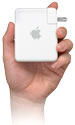 To connect to an AirPort disk in Mac OS X 10.5, simply look in the Shared section in any Finder window sidebar.
The AirPort disk will have the same name as the AirPort base station it is connected to, and an icon such as this:
Select the AirPort network name in the Finder, then select the name of the volume you wish to mount.
If authentication is enabled on the AirPort disk, you will need to enter a username and a password at the prompt.
Related articles
9057.html: About servers and shared computers
To connect to an AirPort disk in Mac OS X 10.5, simply look in the Shared section in any Finder window sidebar.
The AirPort disk will have the same name as the AirPort base station it is connected to, and an icon such as this:
Select the AirPort network name in the Finder, then select the name of the volume you wish to mount.
If authentication is enabled on the AirPort disk, you will need to enter a username and a password at the prompt.
Related articles
9057.html: About servers and shared computers
Issue or symptom Prior to the installation of Boot Camp drivers for Windows (from the Leopard Install DVD), Windows Vista may indicate that there are some compatibility issues: The following may be reported from "Problem Reports and Solutions > Information about other Problems." "Problem caused by advanced Configuration and Power Interface" "Download and install the driver for Apple Performance Counters" "Windows Vista does not support Built?in iSight" Products affected Mac OS 10.5 Leopard Boot Camp 2.0 Microsoft Windows Vista Solution Installing the Boot Camp Drivers for Windows should
By default, Mac OS X Server version 10.5 in the Standard configuration only accepts mail (SMTP) from computers in the local subnet, as defined in the Server Assistant. If you want to change this, you can use Server Admin in one of two ways: Option 1: Configure the server to accept un-authenticated SMTP from a larger range of addresses Select the Mail Service, then click the Settings button and the Relay tab. Under "Accept SMTP relays from only these hosts and networks" add the network range from which you wish to relay mail. Option 2: Enable authenticated SMTP This will allow SMTP access from any
Issue or symptom .Mac contacts sync to your phone, but calendar events may not sync to your phone, when using the sync menu bar item's Sync Now choice. Products affected Mac OS X 10.5 Leopard iSync Solution To avoid this issue, use the iSync application when syncing with .Mac.
Issue or symptom External displays are detected using Microsoft Windows Vista but may display a black screen. Or, other video issues may occur when using Windows Vista or XP via Boot Camp 2.0. Products affected Intel-based Mac that uses NVidia graphics Mac OS X 10.5 Leopard Boot Camp 2.0 Solution This solution only applies to Macs using NVidia graphics. Updating your NVidia graphics driver in Windows may address the issue. If you're not sure what kind of graphics
In Mac OS X 10.4.x, when looking at the list of registered computers for syncing, you may notice ".Mac Sync Engine" in the list. The .Mac Sync Engine should not be unregistered. If you have unregistered the .Mac Sync Engine, it will add itself automatically the next time you sync with .Mac, but you may need to reset your data again before syncing works as expected.
To remove Boot Camp beta after it has expired is to set the computer clock to a date before the expiration date (which was September 30, 2007) using Date & Time preferences. Note: Mac OS X 10.5 Leopard includes the final release of Boot Camp, Boot Camp 2.0. Do not use these steps if you have upgraded to Mac OS X 10.5 and Boot Camp 2.0. Removing a Windows partition with Boot Camp 2.0 in Leopard is much easier. Open Date & Time preferences and deselect "Set date & time automatically" if it's checked.
This document describes the security content of Xcode Tools 2.5, which can be downloaded and installedfrom http://developer.apple.com/tools/download/. For the protection of our customers, Apple does not disclose, discuss, or confirm security issues until a full investigation has occurred and any necessary patches or releases are available. To learn more about Apple Product Security, see the Apple Product Security website. For information about the Apple Product Security PGP Key, see "How to use the Apple Product Security PGP Key." Where possible, CVE IDs are used to reference the vulnerabilities for further information. To learn about other Security Updates, see Apple
Issue or symptom Running Time Machine backup or restore operations while Aperture is running may lead to inconsistencies in the Aperture database. Products affected Aperture Mac OS X 10.5 Leopard Solution If you use Time Machine with Leopard, be sure to set Time Machine to exclude the Aperture Library from automatic backups. To do so: Open Time Machine. Click the Options button. Click the "+" button in the Do not back up window. Use the resulting file browser to navigate to the location of your Aperture Library. The default location is ~/Pictures/Aperture Library (where "~" represents your home
Issue or symptom You may not be able to delete an America Online (AOL) account-based message in Mail. Products affected Mail Mac OS X 10.5 Leopard AOL email account Solution In Mail, from the Mail menu choose Preferences. Click the Accounts icon. Select your AOL account on the left side if you have more than one account in the list. Click the Mailbox Behaviors pane. In the Trash section, deselect (uncheck) "Store deleted messages on the server". This document will be updated as more information becomes available. Important: Information about products not manufactured by Apple is provided